440 lines
12 KiB
Markdown
440 lines
12 KiB
Markdown

|
# Usage
|
||
|
|
|
||
|
|
You can find the source code of examples [here](https://github.com/unclead/yii2-multiple-input/tree/master/examples)
|
||
|
|
|
||
|
|
## One column
|
||
|
|
|
||
|
|
|
||
|
|
|
||
|
|
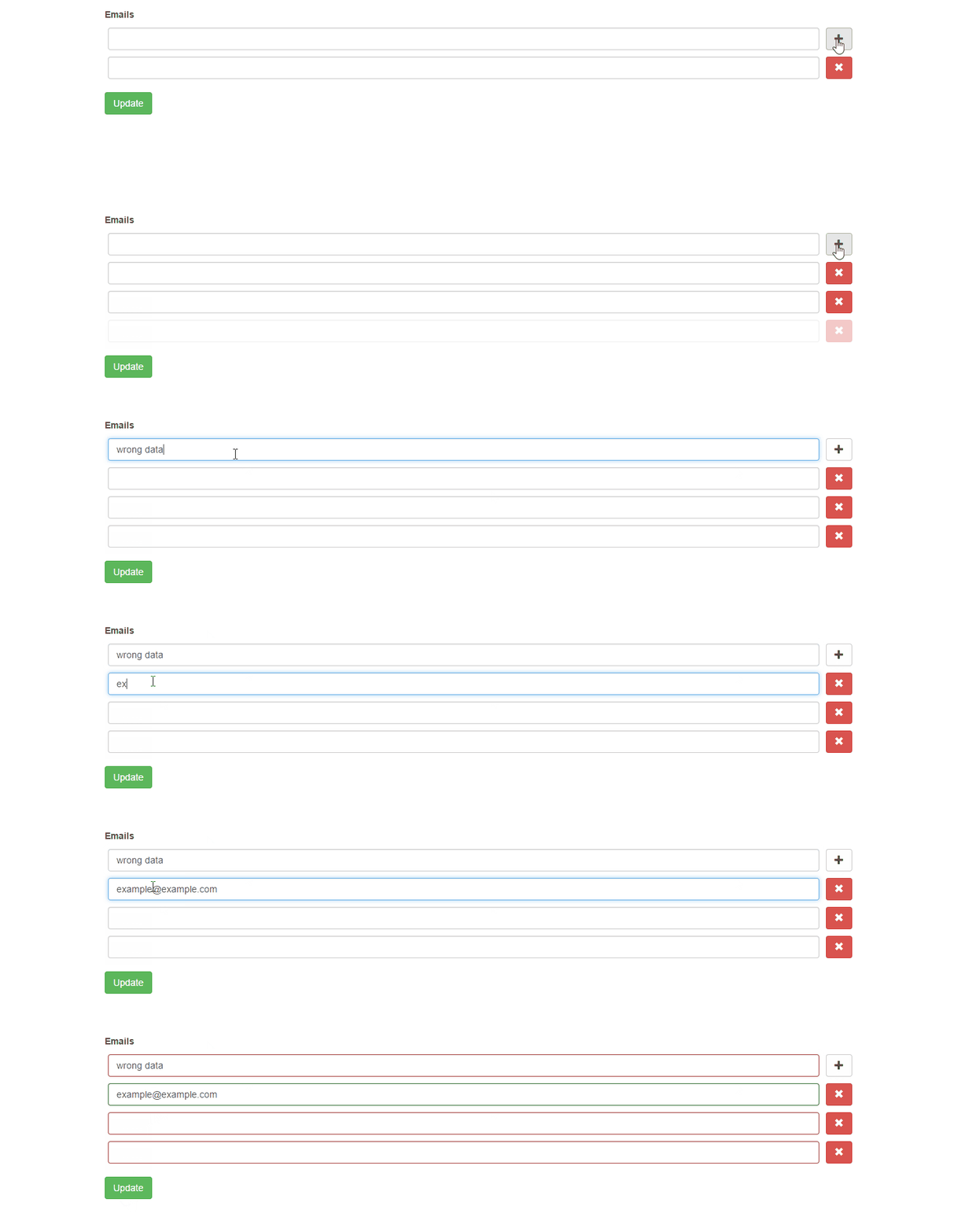
For example, your application contains the model `User` that has the related model `UserEmail` You can add virtual attribute `emails` for collect emails from a form and then you can save them to the database.
|
||
|
|
|
||
|
|
In this case, you can use `yii2-multiple-input` widget for supporting multiple inputs how to describe below.
|
||
|
|
|
||
|
|
First of all, we have to declare a virtual attribute in the model
|
||
|
|
|
||
|
|
```php
|
||
|
|
class ExampleModel extends Model
|
||
|
|
{
|
||
|
|
/**
|
||
|
|
* @var array virtual attribute for keeping emails
|
||
|
|
*/
|
||
|
|
public $emails;
|
||
|
|
```
|
||
|
|
|
||
|
|
Then we have to use `MultipleInput` widget for rendering form field in the view file
|
||
|
|
|
||
|
|
```php
|
||
|
|
use yii\bootstrap\ActiveForm;
|
||
|
|
use unclead\multipleinput\MultipleInput;
|
||
|
|
use unclead\multipleinput\examples\models\ExampleModel;
|
||
|
|
use yii\helpers\Html;
|
||
|
|
|
||
|
|
/* @var $this \yii\base\View */
|
||
|
|
/* @var $model ExampleModel */
|
||
|
|
?>
|
||
|
|
|
||
|
|
<?php $form = ActiveForm::begin([
|
||
|
|
'enableAjaxValidation' => true,
|
||
|
|
'enableClientValidation' => false,
|
||
|
|
'validateOnChange' => false,
|
||
|
|
'validateOnSubmit' => true,
|
||
|
|
'validateOnBlur' => false,
|
||
|
|
]);?>
|
||
|
|
|
||
|
|
<?= $form->field($model, 'emails')->widget(MultipleInput::className(), [
|
||
|
|
'max' => 4,
|
||
|
|
]);
|
||
|
|
?>
|
||
|
|
<?= Html::submitButton('Update', ['class' => 'btn btn-success']);?>
|
||
|
|
<?php ActiveForm::end();?>
|
||
|
|
```
|
||
|
|
|
||
|
|
Options `max` means that a user is able to input only 4 emails
|
||
|
|
|
||
|
|
For validation emails, you can use the following code
|
||
|
|
|
||
|
|
```php
|
||
|
|
/**
|
||
|
|
* Email validation.
|
||
|
|
*
|
||
|
|
* @param $attribute
|
||
|
|
*/
|
||
|
|
public function validateEmails($attribute)
|
||
|
|
{
|
||
|
|
$items = $this->$attribute;
|
||
|
|
|
||
|
|
if (!is_array($items)) {
|
||
|
|
$items = [];
|
||
|
|
}
|
||
|
|
|
||
|
|
foreach ($items as $index => $item) {
|
||
|
|
$validator = new EmailValidator();
|
||
|
|
$error = null;
|
||
|
|
$validator->validate($item, $error);
|
||
|
|
if (!empty($error)) {
|
||
|
|
$key = $attribute . '[' . $index . ']';
|
||
|
|
$this->addError($key, $error);
|
||
|
|
}
|
||
|
|
}
|
||
|
|
}
|
||
|
|
```
|
||
|
|
|
||
|
|
## Multiple columns
|
||
|
|
|
||
|
|
|
||
|
|
|
||
|
|
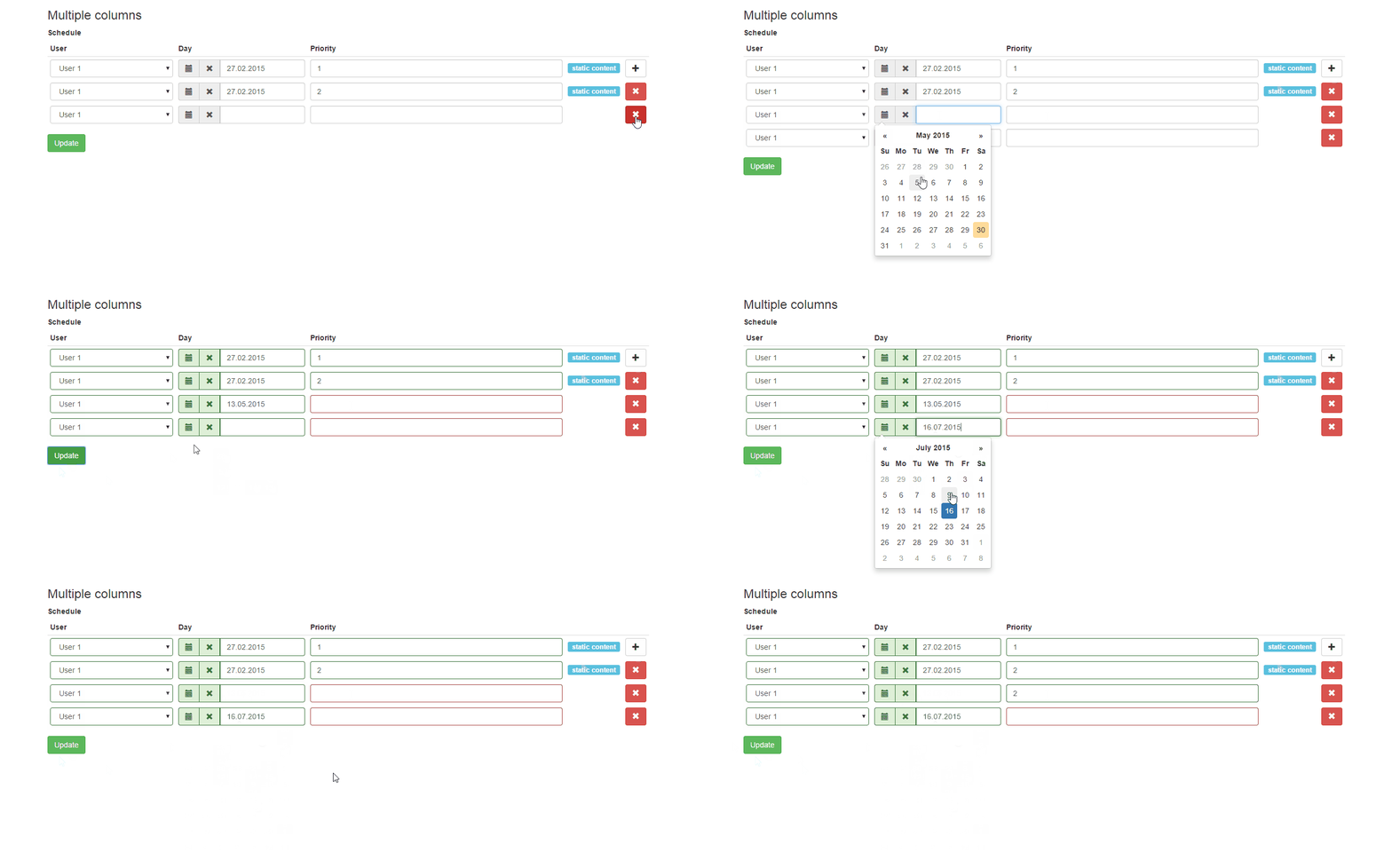
For example, you want to have an interface for manage a user schedule. For simplicity, we will store the schedule in json string.
|
||
|
|
|
||
|
|
In this case, you can use `yii2-multiple-input` widget for supporting multiple inputs how to describe below.
|
||
|
|
|
||
|
|
Our test model can look like as the following snippet
|
||
|
|
|
||
|
|
```php
|
||
|
|
class ExampleModel extends Model
|
||
|
|
{
|
||
|
|
public $schedule;
|
||
|
|
|
||
|
|
public function init()
|
||
|
|
{
|
||
|
|
parent::init();
|
||
|
|
|
||
|
|
$this->schedule = [
|
||
|
|
[
|
||
|
|
'day' => '27.02.2015',
|
||
|
|
'user_id' => 1,
|
||
|
|
'priority' => 1
|
||
|
|
],
|
||
|
|
[
|
||
|
|
'day' => '27.02.2015',
|
||
|
|
'user_id' => 2,
|
||
|
|
'priority' => 2
|
||
|
|
],
|
||
|
|
];
|
||
|
|
}
|
||
|
|
```
|
||
|
|
|
||
|
|
Then we have to use `MultipleInput` widget for rendering form field in the view file
|
||
|
|
|
||
|
|
```php
|
||
|
|
use yii\bootstrap\ActiveForm;
|
||
|
|
use unclead\multipleinput\MultipleInput;
|
||
|
|
use unclead\multipleinput\examples\models\ExampleModel;
|
||
|
|
use yii\helpers\Html;
|
||
|
|
|
||
|
|
/* @var $this \yii\base\View */
|
||
|
|
/* @var $model ExampleModel */
|
||
|
|
?>
|
||
|
|
|
||
|
|
<?php $form = ActiveForm::begin([
|
||
|
|
'enableAjaxValidation' => true,
|
||
|
|
'enableClientValidation' => false,
|
||
|
|
'validateOnChange' => false,
|
||
|
|
'validateOnSubmit' => true,
|
||
|
|
'validateOnBlur' => false,
|
||
|
|
]);?>
|
||
|
|
|
||
|
|
<?= $form->field($model, 'schedule')->widget(MultipleInput::className(), [
|
||
|
|
'max' => 4,
|
||
|
|
'columns' => [
|
||
|
|
[
|
||
|
|
'name' => 'user_id',
|
||
|
|
'type' => 'dropDownList',
|
||
|
|
'title' => 'User',
|
||
|
|
'defaultValue' => 1,
|
||
|
|
'items' => [
|
||
|
|
1 => 'User 1',
|
||
|
|
2 => 'User 2'
|
||
|
|
]
|
||
|
|
],
|
||
|
|
[
|
||
|
|
'name' => 'day',
|
||
|
|
'type' => \kartik\date\DatePicker::className(),
|
||
|
|
'title' => 'Day',
|
||
|
|
'value' => function($data) {
|
||
|
|
return $data['day'];
|
||
|
|
},
|
||
|
|
'items' => [
|
||
|
|
'0' => 'Saturday',
|
||
|
|
'1' => 'Monday'
|
||
|
|
],
|
||
|
|
'options' => [
|
||
|
|
'pluginOptions' => [
|
||
|
|
'format' => 'dd.mm.yyyy',
|
||
|
|
'todayHighlight' => true
|
||
|
|
]
|
||
|
|
]
|
||
|
|
],
|
||
|
|
[
|
||
|
|
'name' => 'priority',
|
||
|
|
'title' => 'Priority',
|
||
|
|
'enableError' => true,
|
||
|
|
'options' => [
|
||
|
|
'class' => 'input-priority'
|
||
|
|
]
|
||
|
|
]
|
||
|
|
]
|
||
|
|
]);
|
||
|
|
?>
|
||
|
|
<?= Html::submitButton('Update', ['class' => 'btn btn-success']);?>
|
||
|
|
<?php ActiveForm::end();?>
|
||
|
|
```
|
||
|
|
|
||
|
|
For validation of the schedule you can use the following code
|
||
|
|
|
||
|
|
```php
|
||
|
|
public function validateSchedule($attribute)
|
||
|
|
{
|
||
|
|
$requiredValidator = new RequiredValidator();
|
||
|
|
|
||
|
|
foreach($this->$attribute as $index => $row) {
|
||
|
|
$error = null;
|
||
|
|
$requiredValidator->validate($row['priority'], $error);
|
||
|
|
if (!empty($error)) {
|
||
|
|
$key = $attribute . '[' . $index . '][priority]';
|
||
|
|
$this->addError($key, $error);
|
||
|
|
}
|
||
|
|
}
|
||
|
|
}
|
||
|
|
```
|
||
|
|
|
||
|
|
For example, you keep some data in json format in an attribute of a model. Imagine that it is an abstract user schedule with keys: user\_id, day, priority
|
||
|
|
|
||
|
|
On the edit page, you want to be able to manage this schedule and you can you yii2-multiple-input widget like in the following code
|
||
|
|
|
||
|
|
```php
|
||
|
|
use unclead\multipleinput\MultipleInput;
|
||
|
|
|
||
|
|
...
|
||
|
|
|
||
|
|
<?= $form->field($model, 'schedule')->widget(MultipleInput::className(), [
|
||
|
|
'max' => 4,
|
||
|
|
'columns' => [
|
||
|
|
[
|
||
|
|
'name' => 'user_id',
|
||
|
|
'type' => 'dropDownList',
|
||
|
|
'title' => 'User',
|
||
|
|
'defaultValue' => 1,
|
||
|
|
'items' => [
|
||
|
|
1 => 'User 1',
|
||
|
|
2 => 'User 2'
|
||
|
|
]
|
||
|
|
],
|
||
|
|
[
|
||
|
|
'name' => 'day',
|
||
|
|
'type' => \kartik\date\DatePicker::className(),
|
||
|
|
'title' => 'Day',
|
||
|
|
'value' => function($data) {
|
||
|
|
return $data['day'];
|
||
|
|
},
|
||
|
|
'items' => [
|
||
|
|
'0' => 'Saturday',
|
||
|
|
'1' => 'Monday'
|
||
|
|
],
|
||
|
|
'options' => [
|
||
|
|
'pluginOptions' => [
|
||
|
|
'format' => 'dd.mm.yyyy',
|
||
|
|
'todayHighlight' => true
|
||
|
|
]
|
||
|
|
],
|
||
|
|
'headerOptions' => [
|
||
|
|
'style' => 'width: 250px;',
|
||
|
|
'class' => 'day-css-class'
|
||
|
|
]
|
||
|
|
],
|
||
|
|
[
|
||
|
|
'name' => 'priority',
|
||
|
|
'enableError' => true,
|
||
|
|
'title' => 'Priority',
|
||
|
|
'options' => [
|
||
|
|
'class' => 'input-priority'
|
||
|
|
]
|
||
|
|
],
|
||
|
|
[
|
||
|
|
'name' => 'comment',
|
||
|
|
'type' => 'static',
|
||
|
|
'value' => function($data) {
|
||
|
|
return Html::tag('span', 'static content', ['class' => 'label label-info']);
|
||
|
|
},
|
||
|
|
'headerOptions' => [
|
||
|
|
'style' => 'width: 70px;',
|
||
|
|
]
|
||
|
|
]
|
||
|
|
]
|
||
|
|
]);
|
||
|
|
?>
|
||
|
|
```
|
||
|
|
|
||
|
|
## Tabular input
|
||
|
|
|
||
|
|
For example, you want to have an interface for manage some abstract items via tabular input.
|
||
|
|
|
||
|
|
In this case, you can use `yii2-multiple-input` widget for supporting tabular input how to describe below.
|
||
|
|
|
||
|
|
Our test model can look like as the following snippet
|
||
|
|
|
||
|
|
```php
|
||
|
|
namespace unclead\multipleinput\examples\models;
|
||
|
|
|
||
|
|
use Yii;
|
||
|
|
use yii\base\Model;
|
||
|
|
// you have to install https://github.com/vova07/yii2-fileapi-widget
|
||
|
|
use vova07\fileapi\behaviors\UploadBehavior;
|
||
|
|
|
||
|
|
/**
|
||
|
|
* Class Item
|
||
|
|
* @package unclead\multipleinput\examples\models
|
||
|
|
*/
|
||
|
|
class Item extends Model
|
||
|
|
{
|
||
|
|
public $title;
|
||
|
|
public $description;
|
||
|
|
public $file;
|
||
|
|
public $date;
|
||
|
|
|
||
|
|
public function behaviors()
|
||
|
|
{
|
||
|
|
return [
|
||
|
|
'uploadBehavior' => [
|
||
|
|
'class' => UploadBehavior::className(),
|
||
|
|
'attributes' => [
|
||
|
|
'file' => [
|
||
|
|
'path' => Yii::getAlias('@webroot') . '/images/',
|
||
|
|
'tempPath' => Yii::getAlias('@webroot') . '/images/tmp/',
|
||
|
|
'url' => '/images/'
|
||
|
|
],
|
||
|
|
]
|
||
|
|
]
|
||
|
|
];
|
||
|
|
}
|
||
|
|
|
||
|
|
public function rules()
|
||
|
|
{
|
||
|
|
return [
|
||
|
|
[['title', 'description'], 'required'],
|
||
|
|
['file', 'safe']
|
||
|
|
];
|
||
|
|
}
|
||
|
|
}
|
||
|
|
```
|
||
|
|
|
||
|
|
Then we have to use `TabularInput` widget for rendering form field in the view file
|
||
|
|
|
||
|
|
Since version **2.18.0** you can configure `columnOptions` also.
|
||
|
|
|
||
|
|
```php
|
||
|
|
<?php
|
||
|
|
|
||
|
|
use yii\bootstrap\ActiveForm;
|
||
|
|
use unclead\multipleinput\TabularInput;
|
||
|
|
use yii\helpers\Html;
|
||
|
|
use \unclead\multipleinput\examples\models\Item;
|
||
|
|
|
||
|
|
/* @var $this \yii\web\View */
|
||
|
|
/* @var $models Item[] */
|
||
|
|
?>
|
||
|
|
|
||
|
|
<?php $form = \yii\bootstrap\ActiveForm::begin([
|
||
|
|
'id' => 'tabular-form',
|
||
|
|
'enableAjaxValidation' => true,
|
||
|
|
'enableClientValidation' => false,
|
||
|
|
'validateOnChange' => false,
|
||
|
|
'validateOnSubmit' => true,
|
||
|
|
'validateOnBlur' => false,
|
||
|
|
'options' => [
|
||
|
|
'enctype' => 'multipart/form-data'
|
||
|
|
]
|
||
|
|
]) ?>
|
||
|
|
|
||
|
|
<?= TabularInput::widget([
|
||
|
|
'models' => $models,
|
||
|
|
'attributeOptions' => [
|
||
|
|
'enableAjaxValidation' => true,
|
||
|
|
'enableClientValidation' => false,
|
||
|
|
'validateOnChange' => false,
|
||
|
|
'validateOnSubmit' => true,
|
||
|
|
'validateOnBlur' => false,
|
||
|
|
],
|
||
|
|
'columns' => [
|
||
|
|
[
|
||
|
|
'name' => 'title',
|
||
|
|
'title' => 'Title',
|
||
|
|
'type' => \unclead\multipleinput\MultipleInputColumn::TYPE_TEXT_INPUT,
|
||
|
|
],
|
||
|
|
[
|
||
|
|
'name' => 'description',
|
||
|
|
'title' => 'Description',
|
||
|
|
],
|
||
|
|
[
|
||
|
|
'name' => 'file',
|
||
|
|
'title' => 'File',
|
||
|
|
'type' => \vova07\fileapi\Widget::className(),
|
||
|
|
'options' => [
|
||
|
|
'settings' => [
|
||
|
|
'url' => ['site/fileapi-upload']
|
||
|
|
]
|
||
|
|
],
|
||
|
|
'columnOptions' => [
|
||
|
|
'style' => 'width: 250px;',
|
||
|
|
'class' => 'custom-css-class'
|
||
|
|
]
|
||
|
|
],
|
||
|
|
[
|
||
|
|
'name' => 'date',
|
||
|
|
'type' => \kartik\date\DatePicker::className(),
|
||
|
|
'title' => 'Day',
|
||
|
|
'options' => [
|
||
|
|
'pluginOptions' => [
|
||
|
|
'format' => 'dd.mm.yyyy',
|
||
|
|
'todayHighlight' => true
|
||
|
|
]
|
||
|
|
],
|
||
|
|
'headerOptions' => [
|
||
|
|
'style' => 'width: 250px;',
|
||
|
|
'class' => 'day-css-class'
|
||
|
|
]
|
||
|
|
],
|
||
|
|
],
|
||
|
|
]) ?>
|
||
|
|
|
||
|
|
|
||
|
|
<?= Html::submitButton('Update', ['class' => 'btn btn-success']);?>
|
||
|
|
<?php ActiveForm::end();?>
|
||
|
|
```
|
||
|
|
|
||
|
|
Your action can look like the following code
|
||
|
|
|
||
|
|
```php
|
||
|
|
/**
|
||
|
|
* Class TabularInputAction
|
||
|
|
* @package unclead\multipleinput\examples\actions
|
||
|
|
*/
|
||
|
|
class TabularInputAction extends Action
|
||
|
|
{
|
||
|
|
public function run()
|
||
|
|
{
|
||
|
|
Yii::setAlias('@unclead-examples', realpath(__DIR__ . '/../'));
|
||
|
|
|
||
|
|
$models = [new Item()];
|
||
|
|
$request = Yii::$app->getRequest();
|
||
|
|
if ($request->isPost && $request->post('ajax') !== null) {
|
||
|
|
$data = Yii::$app->request->post('Item', []);
|
||
|
|
foreach (array_keys($data) as $index) {
|
||
|
|
$models[$index] = new Item();
|
||
|
|
}
|
||
|
|
Model::loadMultiple($models, Yii::$app->request->post());
|
||
|
|
Yii::$app->response->format = Response::FORMAT_JSON;
|
||
|
|
$result = ActiveForm::validateMultiple($models);
|
||
|
|
return $result;
|
||
|
|
}
|
||
|
|
|
||
|
|
if (Model::loadMultiple($models, Yii::$app->request->post())) {
|
||
|
|
// your magic
|
||
|
|
}
|
||
|
|
|
||
|
|
|
||
|
|
return $this->controller->render('@unclead-examples/views/tabular-input.php', ['models' => $models]);
|
||
|
|
}
|
||
|
|
}
|
||
|
|
```
|
||
|
|
|